

























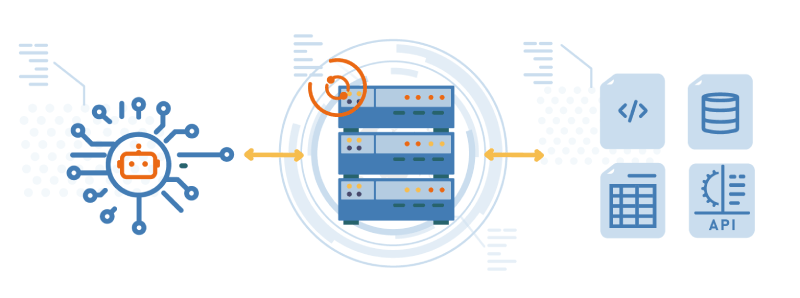
Article written by Malo Lecoursonnais, June 23, 2026
AI agents, whatever their form, impact the world of software development more than any other field. While their impact on modern code no longer needs to be proven, this blog series aims to provide all the keys to applying this revolution to the legacy world, and IBM i in particular.
MCP tools here, MCP server there… The topic is cited, debated, endlessly, sometimes failing to recall the technical basics of a subject that is as simple as it is essential in the agentic era. So what is MCP, and what role does it play?
The basics
MCP, short for Model Context Protocol, is a standardized protocol for connecting IT services to AI.
Simple.
A few even simpler use cases:
- MCP lets you order an Uber driver from ChatGPT (yes, it’s possible)
- MCP lets you book a hotel on Airbnb from Claude (yes, it’s possible)
- MCP lets you retrieve your ARCAD cross-references from GitHub Copilot (yes, it’s possible)
The key component: the MCP server
While the idea of interconnecting AI and IT services is clear, one obvious barrier remains: language.
Indeed, while you can converse in English, French, or Chinese with AI agents, it’s the rigorous REST APIs that handle communication for IT services.
The MCP server then steps in as a translator between these two worlds.
2 different languages
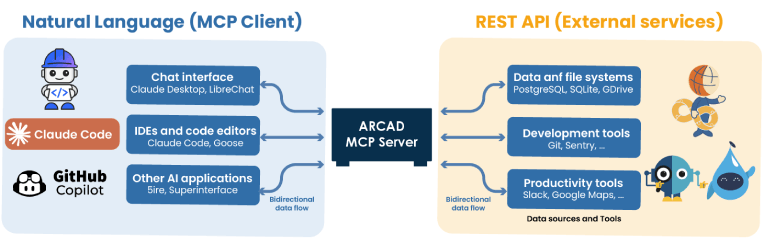
On the left, the AIs (MCP Client) and on the right, the target services, such as the ARCAD for DevOps products or DROPS, for automated environment deployment.
Configure your IBM i MCP server
By default, your MCP server can communicate with any AI agent, but with no IT service. Indeed, to interact with the latter, you need to configure what are called tools.
A tool defines, from your MCP server’s perspective, an interaction with an IT service. It contains two main things:
- Description (in natural language)
- REST API request and its arguments
A good MCP server is first and foremost a catalog of ready-made tools. What ARCAD offers with its MCP server is 60+ tools for IBM i mapping, and 200+ tools for using its DevOps products. What’s more, creating your own tools has been simplified as much as possible, requiring only a few minutes.
How the AI consumes the MCP server
After adding the MCP server to your AI, the latter will automatically discover the tools hidden within it. To be more precise, your AI will now add the description of each available tool to your future prompts, invisibly.
The agent now has a list of tools with their respective purposes, and can draw on them at your explicit request or on its own initiative (hence the importance of the description field).
The MCP server: a pillar for AI in IBM i
In an AI environment for IBM i, your MCP server(s) are the key to success. They enable full integration, from your agents, of the development tools your developers and AIs will never be able to do without.
For example, ARCAD MCP Server lets code assistants access mapping, versioning, and even large-scale deployment of your IBM i applications without error. In terms of governance, a strong emphasis has been placed on strict IBM i access management, as well as broad compatibility that allows it to assist any AI agent: IBM Bob, Claude Code, GitHub Copilot, Mistral Vibe, ChatGPT Codex…
This article is part of the AI on IBM i series:
- AI on IBM i: Demystifying MCP, the Toolbox for AI Agents
- AI on IBM i: Turn Your Expertise into Skills
- AI on IBM i: Agentic AI to Modernize, ARCAD to Ensure Reliability
- AI on IBM i: Building a Complete Agentic DevOps Workflow

About the author
Malo Lecoursonnais
Solutions Architect
Malo holds a degree from IMT Atlantique and specializes in the integration of AI solutions for IBM i and modern environments. As Solutions Architect at ARCAD, he supports our clients in modernizing their application portfolio, from design through to implementation, with a relentless focus on user experience.
His expertise with AI tools and his product vision feed directly into the evolution of Gianni and ARCAD MCP Server, helping IBM i teams regain mastery of their code. Drawing on international experience and a passion for teaching, he helps spread best practices in AI development internationally.

REQUEST A DEMO
Let’s talk about your project!
Speak with an expert